
Organize API Endpoints with OpenAPI Tags
Tags are a great way to organize the API endpoints in your OpenAPI documents.
Typically, OpenAPI tags are used to group related endpoints in a meaningful way, such as by business function or logical objects. When using tags, you define an array of tags at the root of your document, like this:
tags:
  - name: stations
    summary: Stations
    description: |
      Find and filter train stations across Europe, including their location
      and local timezone.
    externalDocs:
      description: Read more
      url: http://docs.example.com/guides/stations
  - name: trips
    summary: Trips
    description: |
      Timetables and routes for train trips between stations, including pricing
      and availability.
  - name: bookings
    summary: Bookings
    description: |
      Create and manage bookings for train trips, including passenger details
      and optional extras.
  - name: payments
    summary: Payments
    description: |
      Pay for bookings using a card or bank account, and view payment
      status and history.

      > warn
      > Bookings usually expire within 1 hour so you'll need to make your payment
      > before the expiry date
The name property is required and must be unique across all tags in the document. It is used to reference the tag in the tags property of an endpoint, and is generally considered as a variable name for the tag.
OpenAPI v3.2 introduced the summary property, which is a human-readable short description of the tag. Often this is just a Case Title version of the name but it can be anything, just keep it short so it fits nicely into API reference documentation navigation menus as that’s generally what it’s used for.
The description property can be used to provide more detailed information about the tag. This can be really in depth and fully explain what the concept means, because e.g: Account or Unit could mean infinite different things in different domains.
You can also link to external documentation using the externalDocs property.
Referencing Tags in Endpoints #
Once you’ve created these tags, you can use them to group related endpoints in your API using the tags property on the endpoint as follows:
paths:
  /stations:
    get:
      summary: Get a list of train stations
      tags: [ stations ]
  /trips:
    get:
      summary: Get available train trips
      tags: [ trips ]
You can also apply multiple tags to an operation:
paths:
  /bookings/{bookingId}/payment:
    post:
      summary: Pay for a Booking
      tags: [ bookings, payments ]
Benefits of OpenAPI Tags #
Tags are a powerful tool for improving the usability of your OpenAPI document. Below are some of the ways using tags can help keep your OpenAPI document organized.
Tags Can Describe Endpoint Groups #
When specifying your tags in the root level of your API contract, you can give context to the tag using the description property.
Let’s take Bump.sh API documentation. Here is how the Diffs tag is created and described in Bump.sh API Contract:
tags:
  - name: diff
    summary: Diffs
    description: Diff summary of changes in the API
The documentation will show the diff tag like this:
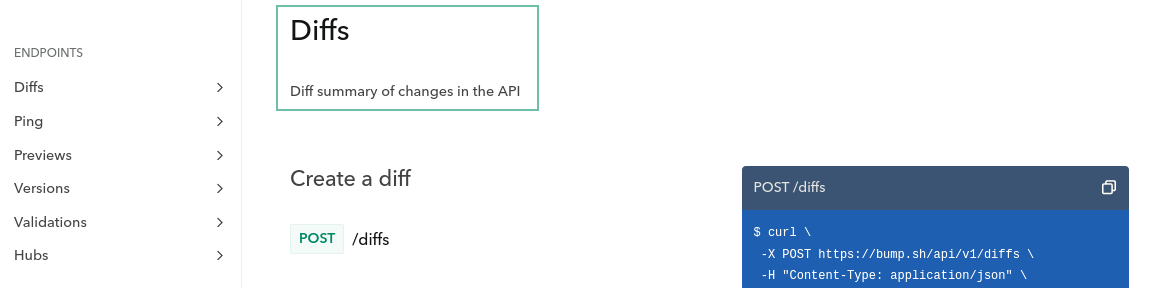
Note that you can use markdown in the description field to better describe your tags.
Tags Can Link to Additional Documentation #
While the description property is excellent for giving a little more information about a specific tag, you might need to provide additional documentation if the business logic or object represented by the tag is complex and requires further explanation. Let’s take our Diffs example from above. You can provide a link to an external web page where you offer a more detailed explanation using the externalDocs property.
In the code snippet below, the externalDocs property provides a link to a URL using the url property. A description for the URL can also be specified using the description property.
tags:
  - name: diff
    description: Diff summary of changes in the API
    externalDocs:
      description: More details about Diff
      url: /help/api-change-management/
When you generate API documentation for the API contract above, you’ll see the link rendered like this:
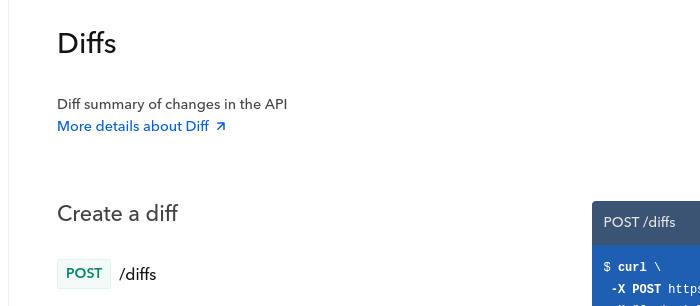
Tags Can Order Endpoint Groups in Documentation #
When specifying your OpenAPI or AsyncAPI tags in the root of your API contract, the order in which you list the tags will define the order in which they appear in the generated documentation. This ordering lets you sort the tags meaningfully.
tags:
  - name: diff
    summary: Diffs
    description: Diff summary of changes in the API
  - name: ping
    summary: Ping
    description: Monitoring status endpoints
  - name: preview
    summary: Previews
    description: Preview for documentation file
  - name: version
    summary: Versions
    description: Deploy your API contracts
  - name: validation
    summary: Validations
    description: Check & validate your API contracts
  - name: hub
    summary: Hubs
    description: Interact with your Hubs
When you generate API documentation, you’ll notice the documentation orders the endpoint groups in the same way:
Note that Bump.sh helps you order your endpoints and webhooks using a “Group by tag” operation. It is actually the default behaviour of Bump.sh when you have these tags defined and have not selected an other sorting option for your Bump.sh API documentation.
Now that you understand what tags are and their benefits, you’ll see some best practices you should follow when using OpenAPI tags in API contracts.
OpenAPI Tags Best Practices #
Tag Everything #
When using tags, make sure you tag all your endpoints.
Notice how all diff-related endpoints are tagged with the diffs tag in this snippet:
paths:
  /diffs:
    post:
      tags: [ diff ]
      summary: Create a diff
      [...]
  /diffs/{id}:
    get:
      tags: [ diff ]
      summary: Fetch detailed information from an existing diff
      [...]
You can see live how they are all available under the section Diffs. By clicking the name of the section in the left menu, the tagged endpoints will show up.

Untagged endpoints will not show up under any big section represented by a tag of your documentation generated by Bump.sh
To ensure your endpoints remain logically grouped and ordered, always tag every endpoint, even if it means creating a tag for a single endpoint.
Make Every Tag Unique #
When defining the list of tags in the root of your API contract, make sure not to duplicate tag names. Since the tag’s name property links an endpoint to a tag, duplicate names are likely to confuse developers looking at the API contract.
The code snippet below contains the root Tag Object in an API contract. Notice how the validation tag has been duplicated, and the second definition contains a different description to the first:
tags:
  - name: diff
    summary: Diffs
    description: Diff summary of changes in the API.
  - name: version
    summary: Versions
    description: Deploy your API contracts.
  - name: validation
    summary: Validations
    description: Check & validate your API contracts.
  - name: documentation_change
    summary: Documentation Change
    description: Check & validate your API contracts.
  - name: validation
    summary: Validations
    description: Validate your API status.
These duplicate tags would confuse anyone trying to understand your API contract, as they wouldn’t know which of the two tag definitions an endpoint belongs to.
Instead, make sure you define and describe every tag only once in the root Tag Object, like in the snippet below:
tags:
  - name: diff
    summary: Diffs
    description: Diff summary of changes in the API.
  - name: version
    summary: Versions
    description: Deploy your API contracts.
  - name: validation
    summary: Validations
    description: Check & validate your API contracts.
  - name: documentation_change
    summary: Documentation Change
    description: Check & validate your API contracts.
Define All Your OpenAPI Tags in the Root Tag Object #
The OpenAPI specification doesn’t require you to define all your tags in the root Tag Object of your API contract. This means you can add a tag to an endpoint without listing it in the root Tag Object, but this is a bad idea. You won’t be able to control what order the OpenAPI tags should appear in, and you won’t be able to add a description or provide a link to external documentation for that tag. It can also confuse developers browsing your API contract as they won’t see a list of all the tags used in the API contract.
As an example, consider the code snippet below where the Previews and the Ping tags has not been included in the root Tag Object:
tags:
  - name: Diffs
    description: Diff summary of changes in the API
  # Missing Previews tag
  # Missing Ping tag
  - name: Versions
    description: Deploy your API contracts
  - name: Validations
    description: Check & validate your API contracts
  - name: Hubs
    description: Interact with your Hubs

paths:
  /diffs:
    post:
      tags: [ Diffs ]
  /diffs/{id}:
    get:
      tags: [ Diffs ]
  /hubs/{hub_id_or_slug}:
    get:
      tags: [ Hubs ]
  /versions:
    post:
      tags: [ Versions ]
  /validations:
    post:
      tags: [ Validations ]
  /previews:
    post:
      tags: [ Previews ]
  /previews/{preview_id}:
    put:
      tags: [ Previews ]
  /versions/{version_id}:
    get:
      tags: [ Versions ]
  /ping:
    get:
      tags: [ Ping ]
When you generate the documentation, notice how the Previews and Ping sections are at the bottom of the list.
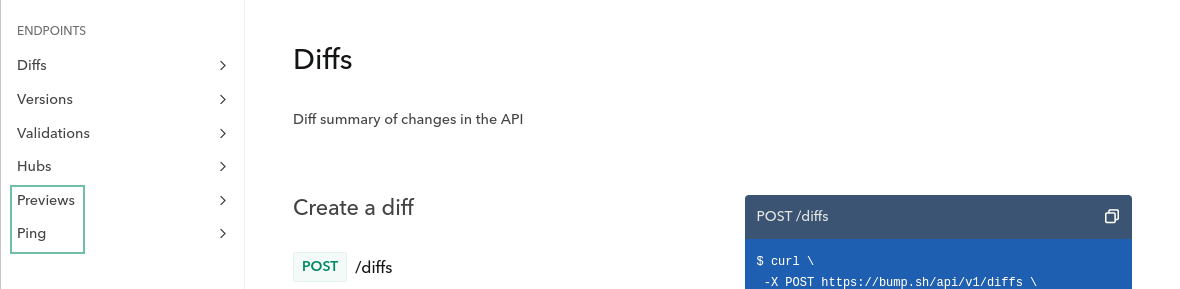
This incorrect ordering and lack of description will make this section much harder to understand for a developer consuming your API.
On the other hand, notice how every endpoint in the API contract below has a tag also defined in the root Tag Object:
tags:
  - name: Diffs
    description: Diff summary of changes in the API
  - name: Ping
    description: Check the API status
  - name: Previews
    description: Preview changes to an API Documentation
  - name: Versions
    description: Deploy your API contracts
  - name: Validations
    description: Check & validate your API contracts
  - name: Hubs
    description: Interact with your Hubs

paths:
  /diffs:
    post:
      tags: [ Diffs ]
  /diffs/{id}:
    get:
      tags: [ Diffs ]
  /hubs/{hub_id_or_slug}:
    get:
      tags: [ Hubs ]
  /versions:
    post:
      tags: [ Versions ]
  /validations:
    post:
      tags: [ Validations ]
  /previews:
    post:
      tags: [ Previews ]
  /previews/{preview_id}:
    put:
      tags: [ Previews ]
  /versions/{version_id}:
    get:
      tags: [ Versions ]
  /ping:
    get:
      tags: [ Ping ]
By doing this, your documentation will display the endpoint groups in the correct order along with the tag’s description.
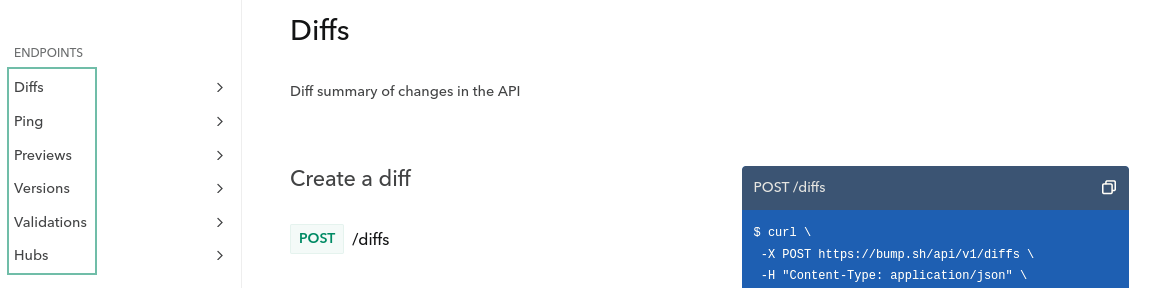
Conclusion #
In this article, you learned more about OpenAPI tags and their value in an API contract. You also learned that you can add descriptions and external documentation links to the tag. This article has also shown you some best practices to follow when using tags that can improve the quality of your generated documentation.